

Bad WiFi?
We can fix that.
218-546-3726Reliable WiFi in every room.
Take video calls across the home, no more dead zones.

Justin & Brooke, a husband-and-wife teamFamily owned in Staples, MN
Same internet plan.
More than 5× the speed.1
UniFi with hardwired access points
vs.
Mesh with WiFi extenders
- More than5× fasterdownload speed, same 1 gig plan1
- About81% less delayping: 15 ms vs. 78 ms1
- Abouthalf the lagwhile downloading: 42 ms vs. 82 ms1
Both homes pay for 1,000 Mbps. The mesh home received 167 Mbps, about 17% of what it pays for. The UniFi home received 929 Mbps, about 93%. Same plan, same test app, both over WiFi. The difference is how the WiFi gets to each room. In the UniFi home, each access point is hardwired through the wiring already in the walls. In the mesh home, extenders pass the signal along through the air.
*Actual results may vary.
The PROOF.(That’s in the pudding)
See below. Watch for the peaks. More picture on the TV, more sound, more detail, and more devices (smartphones, streamers, computers) all create peak draws.
- What the family used (download)
Now picture that same day in a dead zone.
A dead zone is a room where the WiFi is weak. We estimate a dead zone often delivers only about 4 to 10 Mbps, and it rises and falls. Every time your home needs more than that, something has to wait: the call freezes, the show buffers, the page spins.
- What your home tried to use
- What the dead zone delivered (about 4–10 Mbps)
- Couldn’t keep up: frozen calls, buffering
- What we recommend is enough download speed to factor in speed loss over WiFi distance from your access points.
- Through UniFi, you’ll know exactly if your setup is meeting your WiFi demands.
- After we install, UniFi shows your home’s real use, peaks and all, like the chart above. If you’re paying for more than you use, like a 2,000 megabit plan your home never comes close to, you’ll see it.
- We don’t sell internet plans, so this advice is free and independent.
Two real homes, same internet plan (1 gig download, 40 Mbps upload), tested the same way with Speedtest.
The actual speed tests:


*Actual results may vary.
WiFi where you need it most.
We will put a wired access point in the areas you need WiFi the most. Every room can have its own access point, or we can divide by every level and space. It’s completely up to you. Most in-home walls won’t drastically reduce speeds; one access point on each level, configured to its maximum settings, can suffice for enjoyable WiFi.
Drawing for illustration. Access points sit on a shelf or a small stand. We’ll pick the best spot for each room.
Why you need this, and why it’ll be one of your FAVORITE additions to your home.
You don’t realize it until you make the shift. What you’re experiencing now is a lifetime of tolerating poor connectivity, because no one raised their hand and said, we can fix that.
Odds are you’ve taken conference calls and face chats, and moved around finding the right spot for good WiFi, only to find nothing quite worked.
Chances are, family visited, and that left you on calls over WiFi in the basement or other poor WiFi zones throughout your house.
Also, twice a year your phone or laptop updates. How long was that download? Some update files are reaching 7 gigabytes; that’s over 7,000 megabytes.
Or your laptop suddenly shuts off, requiring another lengthy download.
- The important business call? Were you focused, or were you tolerating a poor signal, fighting through it?
- When your children FaceTimed and shared life’s best moments, was it blurry? Was it coming in and out?
- Did you have to end the FaceTime and convert to a voice-only call?
These are little moments, precious, that have been withstood long enough. Not a huge enough problem on its own, but so many of them stack up that you begin to wonder why you’ve tolerated this so long.
This is Premium Home WiFi.
- Your children’s newborn, the grandkids’ new puppy. You get to experience this now in peace and bliss.
- No more dropped calls when you needed it most.
- Seamless connectivity with your loved ones.
This is what keeps us going. This is Lakes Area WiFi’s purpose:
Keeping you well connected with those you love most.
And how does it look?
(Probably the most important part of this. Does it pass the wife decor test?)


Yes, they are white nodes and cylinders. All of Lakes Area WiFi’s access points are installed on countertops, TV media centers, main desktops, or wherever they fit best. Placement of these nodes is important.
This method is what wins the 60% off professional integration costs:
Any other method means opening up your walls, running new Ethernet cable, and paying per drop for every access point. That’s what launches pricing to $4,000 and up.
Our method?

A coaxial jack and a standard power outlet.
That’s it.
If you have those two things in the room, we can provide this system.
Don’t have the coaxial jack?
No worries!
Time and technology have remedied this almost entirely. WiFi 6E or WiFi 7 access points, using the third 6 GHz band, allow a seamless pass-off over wireless, with close-proximity installation.
Unlike older WiFi extenders, these pass the signal along on the newer, wider 6 GHz band, so far less speed is lost on the way.
Slow speeds? Dead zones?
17% off.
When you call by October 31, 2026.
Free.
DeadZone Assessment, by phone.
Plus
Free DeadZone Assessment
Tell us which rooms drop out or buffer. In a quick phone call, we’ll pinpoint why and how we’d fix it. No cost, no pressure, nobody at your door.
30 Day Money Back Guarantee
Noticeably better WiFi where you told us it was bad, or your money back.
If your WiFi isn't noticeably better in the rooms you told us about, tell us within 30 days of your installation and we'll take the equipment back and refund you 100% in FULL. Every penny refunded, no other hidden fees, period.
We’ll confirm your 17% savings in your one clear price on the phone. Offer ends October 31, 2026.
Call 218-546-3726Example Cost and Comparison
Again, the following is an example; your solution and what’s needed for your home will vary.
Pro integration vs. Lakes Area WiFi, for the same 3,000 sq ft home.
Pro integration: new Ethernet cable runs
$3,000–$6,000+
typical for an existing home. The average pro install is about $3,800.5
| 8 new Ethernet drops, cut into finished walls | $800–$2,400 |
|---|---|
| Wiring panel or network rack | $200–$1,500 |
| 3 WiFi access points, installed | about $750 |
| Network switch | $100 and up |
| Labor and setup | $50–$100 an hour |
| Drywall patching and paint | usually extra |
Comparable Lakes Area WiFi solution
$1,309.74
with 17% off when you call by October 31, 2026. Regular price $1,578.
$1,578
Nearly 60% less than the average pro install. Installed and set up.5
**Your quote will vary. Depending on your home, it may come in lower, or higher.
Call 218-546-3726*Actual results may vary.
Need to talk it over?
We get that! So call in when you’re both home and put it on speaker. We’ll explain everything to both of you. Over the call, you get an offer and a price.
We will discuss what WiFi solution is needed at the minimum, and also price what it’ll be to get WiFi in the garage, over the patio, the shed, or more.
What we'll never do
- Ask for remote access to your computer.
- Take payment over the phone before we've visited.
- Start any work before you have a written price.
HOW we fix that?Using the wiring already in your walls.
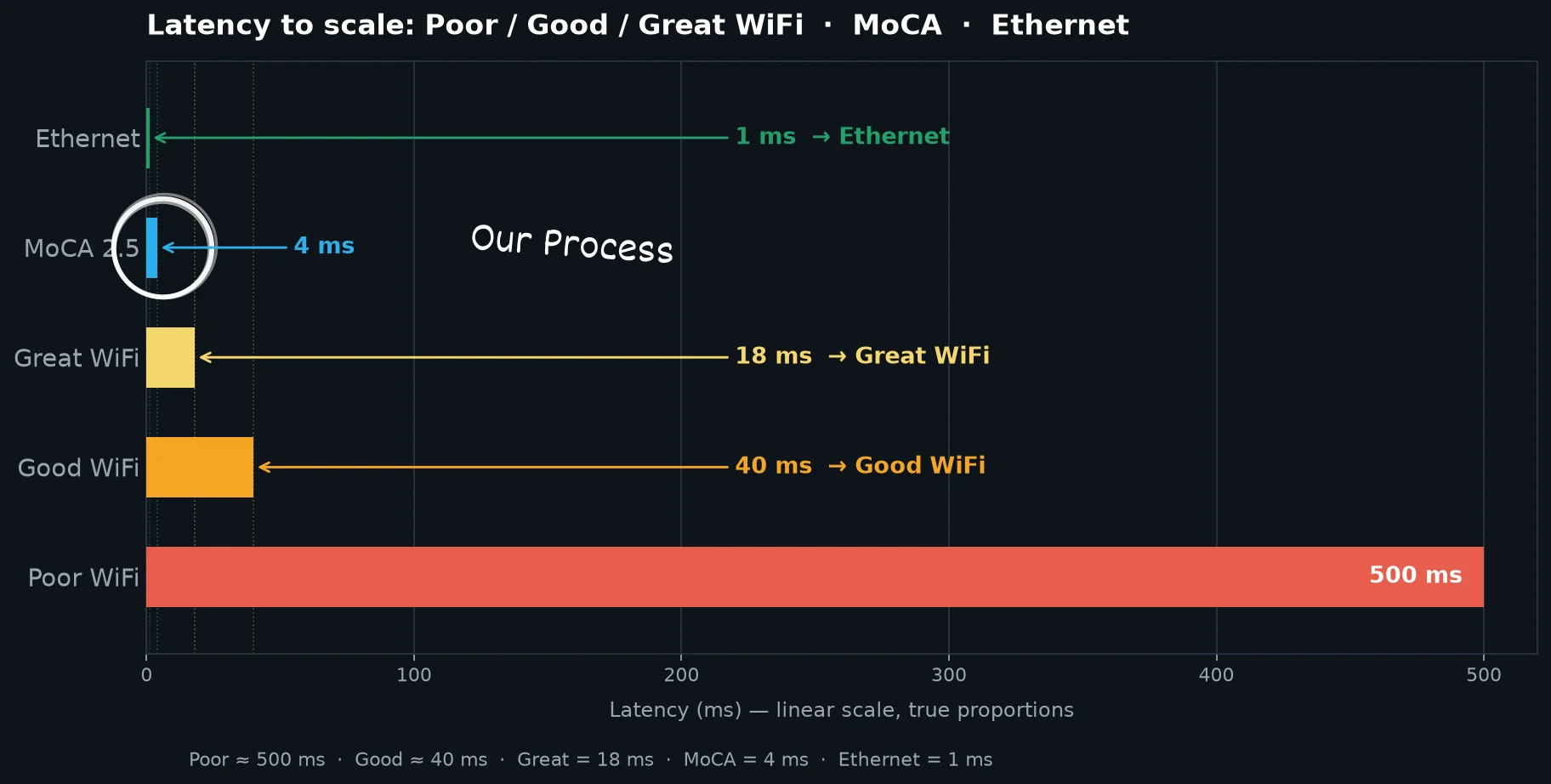
We install pro-grade UniFi WiFi and connect it over the wiring already in your walls. Every WiFi point gets a wired connection. The whole house becomes a hardwired pro-grade solution: about 99% lower latency than poor WiFi.
Your internet comes in
Keep your internet company. At your router, we add pro-grade UniFi WiFi from Ubiquiti.
The wiring in your walls carries it
Small adapters (called MoCA) turn the coax you already have into a wired link to each room. No new cable runs, no drilling, no electricians.
Full WiFi in the far rooms
Each far room gets a small WiFi point on its own wired link: full-strength WiFi, not a weak relay.
No usable coax where it's needed? We'll tell you on the call and suggest a simpler WiFi option that fits your home and budget. Not every home qualifies, and that's what the free assessment is for.
Hardwired latency
Latency is the delay before a video call, web page or show responds. Lower is better.
What the numbers mean
Three numbers tell you how your internet feels. Here's what each one means for the two of you.
Download speed
The most important number
Everything coming in to you: opening a website, scrolling Facebook, watching Netflix or YouTube, and the picture on a video call. It's measured in Mbps (megabits per second). Netflix recommends 5 Mbps for Full HD and 15 Mbps for 4K.
Upload speed
What you send out: your side of a video call, photos you share, and backups. An HD video call sends about 4 Mbps. Most homes do fine with about 40 Mbps of upload, twice the FCC's 20 Mbps standard for home internet. You don't need 1,000. Both homes in the speed tests above pay for 40 Mbps of upload.
Latency (ping)
The delay before anything starts, measured in milliseconds (ms). It's why a video call freezes or a show hesitates. Lower is better.
We aim to improve both download speed and latency. After we install, we test again and show both of you the real before-and-after results.
Why WiFi cuts out, freezes or lags
- The WiFi is far awayThe signal has to push through walls and floors.
- Too many devices, one weak signalPhones, TVs and tablets all share it.
- Everyone is online at onceAfter work and school, around 5 or 6, everyone gets home. TVs stream, phones scroll, music plays, and video and voice calls start. That’s a peak WiFi window where you’ll need this solution.

UniFi In-Wall HD, on a stand
WiFi for the bedroom.
A wired TV, too.
The In-Wall HD sits on a small stand. It spreads strong WiFi through the bedroom. On the bottom are extra network ports. Plug your Apple TV 4K into one, and your TV gets a hardwired connection, while phones and tablets in the room use the WiFi.3
- 1 wire in through the wiring already in your walls
- 4 ports out for a TV streamer, game console or computer3
- WiFi for everything else in the room
Four ports on the bottom
Plug in what matters most.
One wire comes in through the wiring already in your walls. Four Ethernet cables go out to your streamer, game console or computer. Those get a hardwired connection. Everything else in the room gets strong WiFi.4
- The one wire in, through the wiring already in your walls
- Ethernet cables out to your devices
- Two different real homes, not a before-and-after of one home. Both pay for the same internet plan: 1,000 Mbps download and 40 Mbps upload. One uses a mesh system with WiFi extenders. The other uses a UniFi U6 Mesh access point (WiFi 6), hardwired through the wiring already in the walls. Both were tested over WiFi by Lakes Area WiFi with the Speedtest app. Results in your home will vary.
- UniFi In-Wall HD: 1 network port in and 4 out, per Ubiquiti’s specifications. Apple TV 4K: only the Wi‑Fi + Ethernet model has a network port; the Wi‑Fi-only model connects by WiFi. Apple TV is a trademark of Apple Inc.
- The device needs its own network port. Most computers, PlayStation 5, Xbox Series X|S, Fire TV Cube and the Apple TV 4K Wi‑Fi + Ethernet model have one. Fire TV Sticks and the Wi‑Fi-only Apple TV 4K don’t. Product names are trademarks of their owners.
- Pro integration figures are industry averages, not quotes: Cost to Renovate (2026) puts an existing-home Ethernet drop at $100–$300 installed, a wiring panel or rack at $200–$1,500, and each WiFi access point at about $250 installed; Forbes Home puts the average professional Ethernet install at $3,800 (2,000 ft of Cat6, up to 8 connections); HomeGuide puts existing homes at $3,000–$6,000+. Every home is different; your price is confirmed in writing after your free assessment. UniFi Dream Router 7 covers about 1,500 sq ft and each U6 Mesh about 1,500 sq ft, per Ubiquiti.
How it works: three simple steps
Call or text us
Your free DeadZone Assessment happens right on the phone.
One visit
We work through your existing coaxial connections. No drilling, no electricians, no mess.
We walk you through it
We test every room and get your TV, phones and tablets connected before we leave.
Who you’ll chat with

Read the video transcript
TODO(Justin): paste the transcript here.
Hey, I’m Justin. Previously a District Trainer for 5 years, I conducted in-aisle training, live seminars and live product demonstrations throughout Bemidji, Brainerd, St. Cloud and the Twin Cities, across technology retailers like Best Buy, OfficeMax, Office Depot and Micro Center.
I’ve more than likely trained individuals who have probably helped you.
I relocated from Southern California to the Twin Cities in 2018, then moved to Staples in 2020. (Don’t worry, this small-town living secret is safe with me.)
I’ve spent the past 3 years in the home improvement sphere, participating in events across the Brainerd Home Show, the Willmar Home Show, the Bemidji Home Show, the Little Falls Arts and Crafts Fair, the Crow Wing County Fair, the Beltrami County Fair and more. Do I look familiar? (Odds are you saw me there!)
I never really got into fishing or hunting (never been, honestly), or golf. I just love tech. I enjoy it. It genuinely fascinates me what’s out there in tech these days.
You travel, right? There’s actually a travel router out now. The next time you travel, you can bring this travel router (the size of a power bank or smartphone) and share your at-home WiFi logins with a Fire Stick you brought along, your family’s smartphones, an Alexa and more. No need to painfully connect each device to the hotel’s WiFi. Don’t have a good cellular connection? See if the hotel has an exposed Ethernet jack. More than likely, you can plug in and send WiFi throughout your hotel room over that connection. (You business professionals are going to love me for that one.)
What about your Alexa? Listen to music on it? There’s a portable dock for that bad boy. You can bring the tunes to the patio, the grill, the backyard or the garage. (But you’ll probably need a Lakes Area WiFi solution to reach that far.)
Smart appliances these days… this one I’m embarrassed to admit. Through smart features, I programmed my Bosch dishwasher to start cleaning dishes at 4 a.m. Why did I do that? So I can wake up to nice, freshly warmed dishes in the morning. In the winter, this one is a power move.
Truly embarrassed about that one! But wow, what an experience.
My favorite new find (my basement recently flooded), I want to scream this one from the rooftops: LEAK DETECTORS. Let’s get these little devices in your basement, so you get an alarm when water’s detected down there.
(All of these things require a nice WiFi backbone throughout your property.)
Beyond this tech enthusiasm (far beyond), I have my faith, my wife, my children and my friends.
Know who you do business with. Add me and the business on socials, please. The links are down below. Keep rooting for me; I need it.
— CEO,
Justin
Watch Lakes Area WiFi grow, encourage from the sidelines, and become a part of our journey.
What’s next?
See the video below. Once affordable, cost-effective solutions are established, we will introduce and transition to Lakes Area Smart.
The goal? “Hey Alexa, turn off everything.” Garage lights, front porch lights, every single light simply turns off.
What’s required? What’s required is what’s needed: a Lakes Area WiFi home.
Stay TUNED!
Serving the Brainerd Lakes area
Based in Staples, MN. We come to you.
Towns
- Staples (home base)
- Brainerd
- Baxter
- Nisswa
- Pequot Lakes
- Crosslake
- Breezy Point
- Pillager
Lakes
All the areas we serve. Nearby lake homes: just ask.
What neighbors say
Google reviews
We're a young, local business, and we'll only ever show real reviews from real customers here. Our first Google reviews are on the way.
In the meantime, ask us anything on the phone. We're happy to explain exactly what we'd do in your home before you spend a dime.
Common questions
Do I have to switch internet companies?
No. We work with the internet you already have: TDS, Spectrum, CenturyLink and others.
Will you drill holes or run new wires?
No. We work through the wiring already in your walls.
Can we both be on the call?
Please do. Put us on speaker and ask anything. There's nothing to decide on the call.
How long does it take?
One visit. Most homes take about two hours.
Do I need to be home?
Yes. We'll show you how it works and connect your TV, phones and tablets before we leave.
What does it cost?
Every home is different. After your free assessment, we'll give you one clear price on the phone, and it's in writing before any work starts. No per-drop wiring charges, no surprises.
What if my home doesn't have coax where it's needed?
We'll know after the phone call. Sometimes a simpler WiFi system is the better fit, and we'll tell you honestly.
What if I'm not happy with it?
You're covered by our 30-day money-back guarantee. If your WiFi isn't noticeably better where you told us it was bad, we'll refund you.
Can I call on behalf of my parents?
Absolutely. We're happy to include you on the call (a three-way call works great), and we'll walk your parents through everything, at their pace.
Rather we call you?
The quickest way: call or text us your name and a good time, and we'll call you back.
218-546-3726Evenings when you're both home are great. We're happy to talk with both of you on speaker.
Thanks! We'll call you.
We'll call from 218-546-3726 around the time you picked. If you'd both like to be on the call, just put us on speaker.
Ready for WiFi that works in every room?
Call by October 31, 2026 to get 17% off, plus a free DeadZone Assessment.
Call for your free DeadZone Assessment.
218-546-3726Call when you're both home and put us on speaker.